Nerd's Realm
★ Est. 2006 · 140+ How-To Guides

Tech Answers. Plain & Simple.

Step-by-step guides for Gmail, Office, Windows, iPhone & more — written so anyone can follow along.

Tips and Tricks

How To Compress Large Files Using Winrar

Compress

Do you wish to compress files so that it can transfer easily between storage devices, or when you want to upload it to an email or how about when you just want to save precious hard drive space when storing files.Well, now you can just do that.

WinRAR is a powerful archive manager. It can backup your data and reduce size of email attachments, decompress RAR, ZIP and other files downloaded from Internet and create new archives in RAR and ZIP file format. You can download the trial version of the software at www.rarlab.com

To compress large file using Winrar follow simple steps given below:

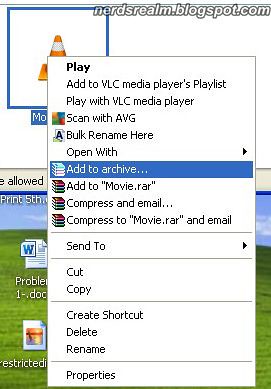
Step 1: Select and Right click on the file you want to Compress and select Add to Archive option.
compress1

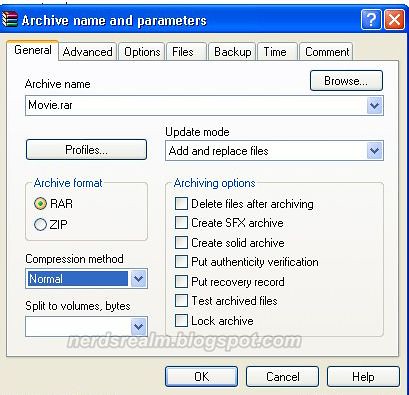
Step 2: A window will pop up with various options. In Archive name field type the name of your archive manually in the text box provided below.
compress2

Step 3: When creating a new archive, you first need to select the archive format. ZIP is preferable when you are not sure that a receiver of your archive has WinRAR. Otherwise just select RAR, since it provides more options and higher compression.

compress4

Step 4: There are six compression methods supported: "Store", "Fastest", "Fast", " Normal", "Good" and "Best". The Best method provides high, but slow compression. Fastest method compresses poorly, but it is very fast. Store method just merges files into an archive without any compression. If you want to create an archive for distribution or for long storage, It would be best to probably ignore the time constraint and choose the Best compression method to reduce the size as much as possible. But for daily backups choose Normal compression method.

compress3

Step 5: At the bottom there is a Tab saying “Split to Volume, Bytes” In the box enter a figure or you can use the drop down menu to make your choice. Remember you have to enter the value in bytes, kilobytes or megabytes and this applies only to .rar extension. (1024 KB equals 1 MB)
In the example below, I have chosen 98078 KB which comes to around 95.77 MB.

compress5

Step 6: When you have chosen the right options for your archive, click the OK button.
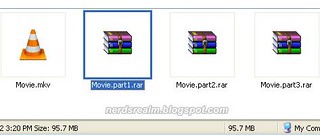
(In my example below, the video file I had chosen was compressed into three parts comprising of 95.7 MB each)
compress6

You can also watch this same procedure on YouTube. I have created the video just to make it easier for everyone to learn.

67 Comments

December 20, 2012 8:28 AM
Helpful tip
February 05, 2013 9:03 AM
impressive website
April 25, 2013 3:43 AM
very very helpful
thanx alot :)
May 03, 2013 8:11 AM
ehm okay nice tips, but i did it well
chiji
May 16, 2013 4:30 PM
Bless you. Your instructions made me navigate to a desired choice. The Profile type is also useful in compressing files. This splits the files in volumes as desired.
Anonymous
May 24, 2013 7:35 AM
helpfull thanks
Anonymous
June 03, 2013 12:15 PM
which version of winrar did you use?
'cause i cant find any "zip 100" or so in the Latest winrar 4.20,
aLso can you teLL me how to compress uncompressed fiLe into a singLe fiLe instead of muLtipLe ones..?
pLease heLp..and pardon my bad engLish :p
June 04, 2013 2:05 AM
@Anonymous,

I used version 3.93 for this tutorial but I have upgraded since then to the latest version of Winrar 4.20 and the options are same.

If you want to compress file into a single file then just don't use the Tab saying “Split to Volume, Bytes” Just leave that option blank and it will compress the file into one file.

Thank You.
Anonymous
July 30, 2013 9:08 AM
how can i compress an installed program and still be able to use it in other computers?
Anonymous
August 06, 2013 8:32 PM
:)
August 09, 2013 3:55 PM
@HaLe Lee: You cannot compress a installed software which is actively being used by the computer as the computer would not be able to access the files once they are compressed.
Anonymous
August 22, 2013 1:57 AM
i have a preview version of Windows 8.1 in and ISO file so my question is should i make it RAR file or ZIP file and i am using CD-R 700 MB............thx i appreciate the help
August 25, 2013 7:03 PM
@Arsalan Khan:

RAR
A RAR file is an archival file created with the WinRAR program. This program can be downloaded as a free trial for a set number of days, but it needs to be purchased and registered for continued use. WinRAR must be used to open RAR files.

ZIP
A ZIP file is an archival file that can be created with several programs, including Freebyte Zip, WinRAR and WinZIP. It also can be created by using the “Archive” function on Macintosh operating systems. WinRAR comes as a free trial, but must be purchased to continue use after the trial expires. ZIP files can be opened with any program that can create ZIP files. It is not restricted to any one program.

Advantages of RAR:
-Even though Zip predates RAR and has many applications able to work with it, RAR format has a lot of advantages.
-A RAR format can compress a file much better than a Zip. Meaning, a same sized file compressed in RAR format produces a slightly smaller size file compared to zip.
-RAR files also incorporate redundancy or a ‘recovery record’ stored within the archive, making it possible to repair a RAR that has been corrupted.
-Newer versions of the format support advanced encryption methods.

So it all depends on what you prefer. I personally use .rar over .zip
August 29, 2013 1:07 PM
I think, this way just split files, not reduce its size.
Anonymous
September 08, 2013 4:22 AM
Thx
Anonymous
September 20, 2013 12:29 PM
Thanks
September 27, 2013 2:21 PM
The suggestion was very informative and helpful. Thanks a lot!!
Trick star
October 07, 2013 3:52 PM
This is called spliting.not large file compress into small file.when u try spliting,this softwar devide a file into many parts.i want to see this site,how can i compress 10gb file into 1mb.can any one tell me.
Anonymous
October 09, 2013 10:54 PM
thank u very much sir
October 26, 2013 9:12 PM
Can I do that with any kind of file? (for instance movies, pictures, documents, iso., etc.) I have a one terabyte harddrive I need to compress as much as possible. It has all kinds of files.
November 06, 2013 12:12 AM
Didn't work here, the thing reduced from 116mb to 110mb -.- yes I selected BEST
November 13, 2013 11:43 AM
thanks
December 07, 2013 3:31 PM
Thanks Dude
Anonymous
January 06, 2014 9:17 AM
good stuff
February 03, 2014 6:32 PM
thank you very much now i can compress my game isos and upload it
February 13, 2014 3:37 PM
Great post,,,,,,,,, keep it up,,,,,,,, well if anyone need another tool for reducing the size of PST files then they can take help with SysTools Compress PST Free demo software.
Anonymous
March 19, 2014 4:57 PM
ur tip is very usefull , thanks buddy !!!
Anonymous
March 31, 2014 10:53 PM
What is the minimum size into which we can compress any 3gb file?
Anonymous
April 12, 2014 12:28 PM
I m compressing my file, but after the process it's size is not changing................mean it's not compressing to a small size
Anonymous
May 02, 2014 9:31 AM
tnx for the tips guys very useful
Anonymous
June 28, 2014 11:31 AM
Well described boss, Thanks and keep this great job going.................
July 09, 2014 10:20 AM
its very useful procedure to send large attachments....... keep it up
July 10, 2014 6:47 AM
This method helps me a lot. Thank you for this tip
July 11, 2014 12:34 AM
@John Betz & mateusk_10:

Most multimedia files will not compress well as they already exist in a highly compressed state. These file types usually employ efficient techniques to compress the data they contain. Examples include, but are not limited to, graphic (picture) files (GIF, JPG, PNG, etc), music files (MP3, WMA, etc), and movie files (AVI, MPG, etc). Files that are compressed, as these examples are, usually cannot be compressed more to any significant extent. Therefore, such files don't get much, if any, smaller when they are added to a Zip file (.rar .zip or .zipx).
Jhudiel
July 26, 2014 12:49 PM
Is the BEST method reduce the size as much as possible but time consumable?
Anonymous
July 31, 2014 1:33 AM
Thanx very much. Cool site.
August 21, 2014 2:47 PM
How does a compression of a file size 2401Kb to 2244 Kb help. We need bigger compression to probably 240Kb to enable us email within our server. Can You assist?
Anonymous
September 01, 2014 5:43 AM
This helped a ton
girls_have_sex_with_me
September 05, 2014 1:27 PM
very helpful and resourceful
Anonymous
September 14, 2014 2:54 AM
I'm not sure will it work,but however thankyou so much
Anonymous
September 15, 2014 7:11 PM
Hi, I have a TV series wich is for 1.66 gb... wen i compress it using winrar its goes to 1.65 gb, using spilt also adds upto the same amt. I did read in the comments that compressing video files is nt of much use as the file size doesnt reduce drastically. Can you please suggest a method for compressing video files... atleast half the storage size would be great..... plz rep asap
Anonymous
October 21, 2014 2:58 PM
Thanks!! Very Helpful
December 23, 2014 9:29 AM
did its affected the original one and after compression one if we running the program?
Anonymous
January 11, 2015 3:48 PM
I have used winrar to compress a massive MUSIC COLLECTION file from a portable external HDD to my laptop, which seems to have worked. It has compressed down from 553GB to 53GB.
However, the whole point was to create a compressed file on my laptop so I could delete the original off of the HDD and thus freeing up more space on it.
However, when I try to delete the original it immediately brings up Winrar errors stating it cannot find original files?
My question, is there a way to compress down and not have to keep the original files in place please?
Many thanks
Glenn
January 12, 2015 11:47 AM
Not impressive
April 14, 2015 6:19 PM
Hello, The tricks still work ?
Anonymous
May 22, 2015 2:16 PM
Were are the unsent compressed email files found? I tried to compress a 5GB video to upload on Facebook but I thought that would work. Now the files are hiding in Drive C and is taking up space. Please help
Anonymous
June 09, 2015 8:24 AM
Thank You so much, It's working :D
Anonymous
June 10, 2015 9:02 PM
Pl help me to compress 8 gb hd video file into 4 gb file without losing any quality to burn into dvd, but later when i enter the 4gb compressed file ,it should be extraced as 8gb
Anonymous
June 24, 2015 10:58 PM
this trick is not working for ma file of around 300mb..? any suggestions..
SRU
September 11, 2015 7:35 PM
how to retrieve the compressed document can any one help me ? i followed the procedure as above but i found my compressed file missing!
Anonymous
October 06, 2015 10:44 AM
Haha, Admin. ..... U said this is COMPRESS LARGE FILES USING WINRAR? Huh? This is splitting winrar files into part 1, part 2, etc. U liar. cheater! Change ur title. Idiot admin
October 26, 2015 10:42 PM
pagal Yeh ticks to sabhi ko pta h I need to know spliting method such that files do not become corrupt
November 09, 2015 7:00 PM
Great Post :)
November 24, 2015 4:42 PM
Even though i select 'Best' method for compression the size of the compressed file remains the same as the normal file. I need to highly compress it!
I am using winrar 5.30 beta 6. on windows10
NEED HELP
Anonymous
December 19, 2015 7:39 PM
nice site useful
December 30, 2015 3:54 PM
Can we compress a rar file before downloading
Anonymous
January 22, 2016 9:40 PM
video audio and image will hard to compress...
don't expect smaller size result if u trying to compress them
December 18, 2016 5:17 PM
Use KGB Archiver to compress 1GB file to 1MB.
you can download this software from the link given below.
https://sourceforge.net/projects/kgbarchiver/
Anonymous
January 07, 2017 1:15 PM
This comment has been removed by a blog administrator.
April 01, 2017 9:29 AM
This comment has been removed by a blog administrator.
May 15, 2017 12:21 PM
This comment has been removed by a blog administrator.
July 28, 2017 11:42 PM
Thank you so much <3
September 21, 2017 11:03 AM
Hi , I am trying to create one setup file for multiple exes n I m using install creator but in the install creator file size must be less than 2gb n my file size is greater than 2gb so bcs of this I m getting error ,I tried to compress exe files but none of compressor r working,Is any other way to compress the file or any other tool to make setup who is supporting more file size?
Anonymous
March 13, 2019 5:02 PM
First off for those of you, wondering why your files aren't compressing that much, it could be because what setting you are using but most likely because you are using a lossy file. Dumping your already heavily compressed files into WinRAR compression and hoping for tiny tiny files is a waste of time. Best results come from compressing lossless files (uncompressed files)
On the best compression setting. I also check test archive and usually run this over night and set the computer to shut down. It takes about 6-9 hrs to complete. I have been compressing old VHS uncompressed captures. Into rars for temporary storage before I upscale and master them later. They range from 30-160gb. (Yes my 5tb of storage can be filled very quickly.) Files that have never been compressed like these, can take a very long time. (And yes I have a fast computer, new gen, just a few months old. Custom build.) I've resorted back to using WinRAR because WinZip just fails on me and creates crc errors nonstop. I don't really try doing split up rars. I kind feel like the more files you have the more danger in corrupted files there will be.
I like being able to manage better too, and it's difficult when you have many hundreds of files going here and there.
Anonymous
March 13, 2019 5:03 PM
First off for those of you, wondering why your files aren't compressing that much, it could be because what setting you are using but most likely because you are using a lossy file. Dumping your already heavily compressed files into WinRAR compression and hoping for tiny tiny files is a waste of time. Best results come from compressing lossless files (uncompressed files)
On the best compression setting. I also check test archive and usually run this over night and set the computer to shut down. It takes about 6-9 hrs to complete. I have been compressing old VHS uncompressed captures. Into rars for temporary storage before I upscale and master them later. They range from 30-160gb. (Yes my 5tb of storage can be filled very quickly.) Files that have never been compressed like these, can take a very long time. (And yes I have a fast computer, new gen, just a few months old. Custom build.) I've resorted back to using WinRAR because WinZip just fails on me and creates crc errors nonstop. I don't really try doing split up rars. I kind feel like the more files you have the more danger in corrupted files there will be.
I like being able to manage better too, and it's difficult when you have many hundreds of files going here and there.
Anonymous
May 28, 2023 9:03 AM
Nice post thank you Tracey