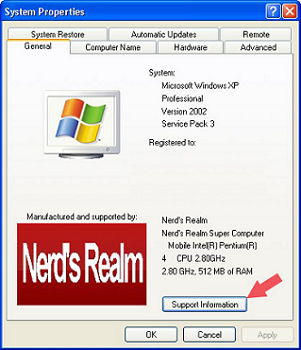
The Windows XP System Properties logo is often changed by the vendors to brand your computer with their own logo and support contact information in order to advertise their services.If you have bought your PC from a vendor, most likely you will see their logo and support information when you open the System Properties.
Now, with a few simple steps, you can easily brand your computer with your own logo and contact information.
To open system properties dialog
Step 1: Click the Start button
Step 2: Right-click "My Computer"
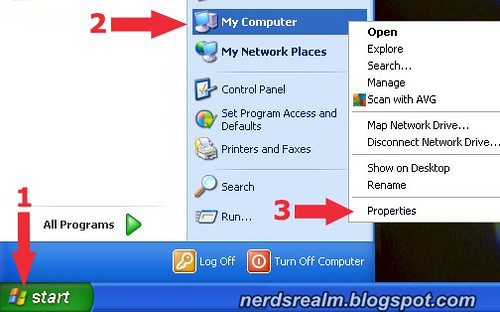

Step 4: Open up any photo editing program (I used Microsoft Paint) and create a 180 x 114 pixels image.

Step 5: Save the image as a bitmap (.bmp) and name it oemlogo.bmp

In addition to the logo you can even add your contact info in the system properties screen.
[General]
Manufacturer=Nerd's Realm
Model=Nerd's Realm Super Computer
[Support Information]
line1=For even more great tips visit
line2=http://nerdsrealm.blogspot.com/
Step 7: And save the text file as oeminfo.ini


Step 6: To do just that open Windows Notepad and add your contact information like the example below:
[General]
Manufacturer=Nerd's Realm
Model=Nerd's Realm Super Computer
[Support Information]
line1=For even more great tips visit
line2=http://nerdsrealm.blogspot.com/
Step 8: Now place both the image file (oemlogo.bmp) and text file (oeminfo.ini) to
C:\Windows\System32
Now open up your System Properties, you should see your own logo and support information in the panel.
By clicking the Support Information a pop up should show you the text that you had written previously.



When someone writes an article he/she keeps the plan of a user in his/her brain that how a
ReplyDeleteuser can be aware of it. So that's why this article is great. Thanks!
Also visit my web-site :: atlaslm.com